Valenta School · School management system

school management systemfor Nigerian schools.

Valenta School runs the whole school — admissions, attendance, results, report cards and fees — in one free system, with portals for teachers, parents and students. It keeps working when the network doesn’t, and it includes an AI tutor that runs on the school’s own computer with no internet at all.

100% freeWorks online & offline
School Management System Free

one system for the whole school

Many schools still run on registers, exercise books and spreadsheets that live on one person’s laptop. Records get lost, results take days to compile and parents have to visit the school to ask simple questions about fees or performance.

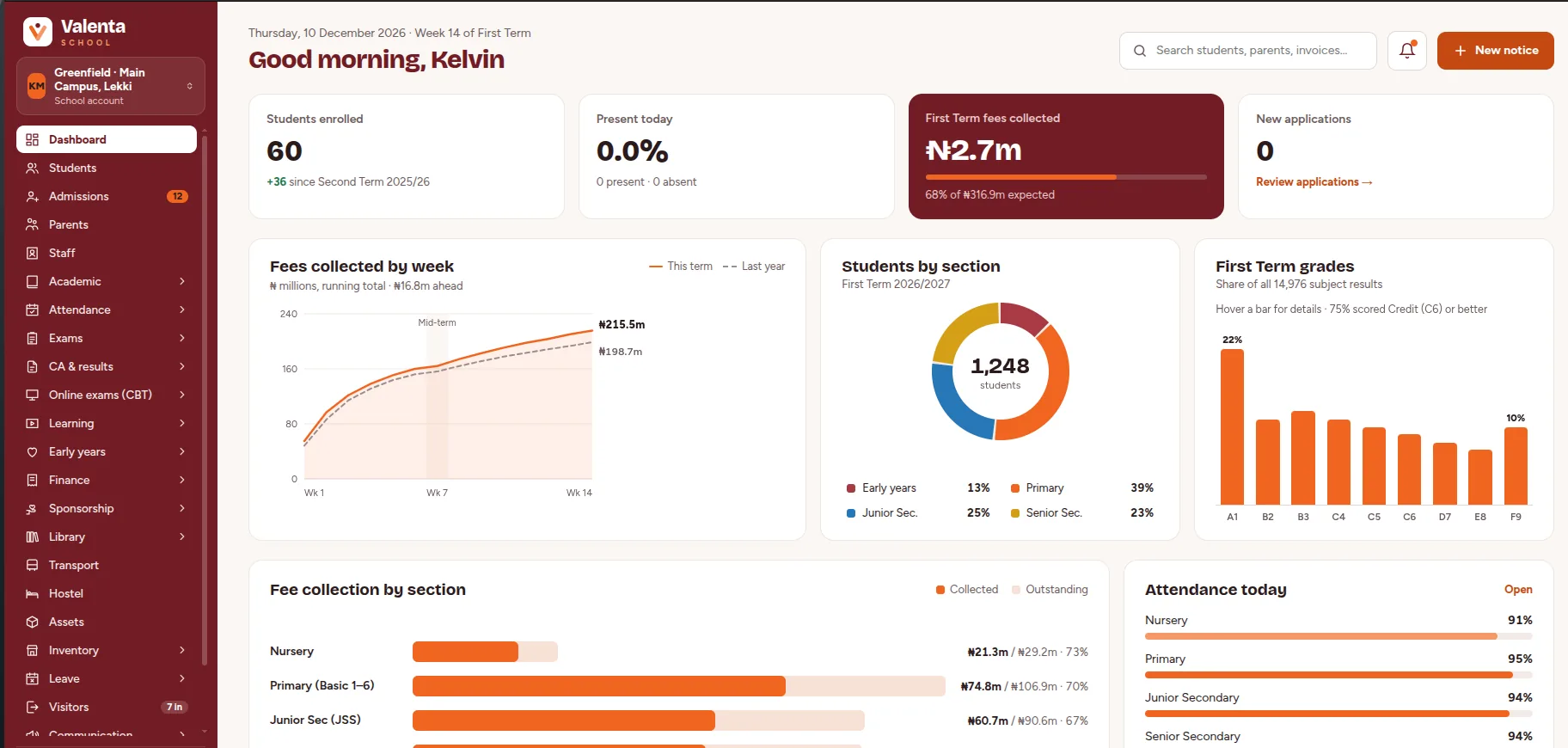
Valenta School replaces that patchwork with one system. Student records, class lists, attendance, grades, report cards and fee balances all live in one place, so the bursar, teachers and school leadership work from the same information.

It is built for real Nigerian conditions. The desktop app runs the full school system on the school’s own computer, so staff keep working when the internet goes down — every change is queued and syncs automatically, in the right order, once a connection returns.

And because the right to education should not depend on a signal bar, Valenta also puts an AI tutor on the school’s computer. No cloud, no API key and no per-student fee.

Valenta School management dashboard
New · Valenta AI

an AI tutor that works with the cable unplugged

AI tutors are changing how children learn, but almost all of them need good internet and a paid subscription. Valenta AI runs a real tutor on the school’s own computer, so a child in a village with no signal gets the same kind of help as a child in Lagos.

  • Fully offline, CPU only

    A small open model runs on ordinary school PCs — no graphics card, no cloud and no per-student or per-question fee. Install it from a USB drive if the school has no internet at all.

  • Knows each child

    Students sign in with their admission number, so the tutor sees their real class and subjects and pitches help at the right level, from Early Years to Senior Secondary.

  • Speak and listen

    Children can ask a question by voice and hear the answer read aloud, offline — a big help for younger children and weaker readers.

  • Grounded in your curriculum

    Schools upload approved learning material. The tutor searches it first, and the screen clearly shows when an answer is not from approved material.

  • Teaches, doesn’t just answer

    A homework guard coaches the child toward the answer instead of handing it over, and child-appropriate safety screening is built in.

  • AI assistant for teachers

    A teacher assistant for lesson planning and classroom help, using the school’s approved material, so one teacher can do more with a large class.

  • Private by design

    Student data never leaves the school’s computer. The model has no database access and no tools — it only sees text the app gives it and never reads or writes official school records.

  • Admin in control

    Switch text and voice on or off, set chat retention, check the computer with a built-in hardware test that recommends a model, and manage approved material and usage.

Valenta AI uses a small local model, so answers can occasionally be wrong. It is built to guide students and to admit when it is not sure, and it is meant to support teachers, not replace them.

desktop app and web portals, one system

Use Valenta School the way your school’s connection allows. Both versions share the same records and stay in step.

Desktop app · works offline

Valenta Desktop

Installs on the school’s own computer and runs the full school system locally, so nothing stops when the internet does.

  • Every screen works with the cable unplugged
  • Home of the offline AI tutor and voice
  • Staff can sign in offline
  • Changes queue and sync in order when you reconnect
  • Backups and restores built in
  • Windows is the supported system today
Web · any browser

Valenta Web portals

Open Valenta School in a browser on a laptop, tablet or phone — no install — with a portal for each role.

  • Admin, teacher, student and parent portals
  • Parents see updates without visiting the school
  • Secure public parent links
  • Online admission form for new applicants
  • Always the latest records once synced
  • Parents are also reached by SMS, no smartphone needed

The desktop app and the web portals work from the same school data. Offline changes sync to the cloud when a connection is available, so staff at school and parents at home see the same picture.

what valenta school handles

The core work of running a school, in one place.

everything else a school runs on

One install to replace the paper registers, fee books and result sheets.

Academics

  • Sessions, terms and classes
  • Subjects and electives
  • Syllabus library
  • Lesson plans

Finance

  • Fee structures and invoices
  • Receipts and student wallets
  • Canteen POS that works offline
  • Expenses, income and payroll
  • Sponsorship programme for children who can’t afford school

Operations

  • Library
  • Transport
  • Hostel
  • Inventory and assets
  • Visitors
  • Staff leave

Learning content

  • Video lessons
  • Live classes
  • E-books
  • Early Years module with daily child-care logs

Reports & insight

  • 35+ built-in reports
  • Custom report builder
  • Admin dashboard
  • Usage stats for the AI tutor

Security & control

  • Role-based access for every portal
  • Every record scoped to its school
  • Hashed, rotating sign-in tokens
  • Staff can sign in offline
  • Backups and restores built in

built for

  • Primary schools
  • Secondary schools
  • Colleges
  • Training centres
  • Schools in areas with unreliable internet
  • Schools with no internet at all
  • Schools that can’t afford subscriptions
  • 100% free

    Every ValentaHQ product is free to use. No licence fees, no per-user charges.

  • Hybrid by design

    Works online and offline, so your team keeps operating smoothly even in areas with poor network.

  • Syncs automatically

    Work done offline is saved on the device and updates everywhere the moment you reconnect.

getting your school started

Try demo ↗
  1. 1

    Talk to us

    Tell us about your school — its size, sections and how you run admissions, results and fees today.

  2. 2

    Set up & configure

    We configure Valenta School around the way your school actually works, not the other way round — and install the AI tutor on the school’s computer, from a USB drive if needed.

  3. 3

    Train & go live

    We onboard and train your staff, and stay available for support after go-live.

valenta school questions

Something else you need to know? Email hello@valentahq.co and a real person will reply.

Yes. Valenta School is free to use — there are no licence fees and no per-user charges. Contact ValentaHQ to get it set up for your organisation.

Yes. Valenta School keeps working when the network drops. Work done offline is saved on the device and syncs automatically once you are back online, so you never have to stop and wait for a connection.

Admissions and student records, attendance, timetables and classes, assignments, CBT exams, report cards and results, fee billing with receipts and student wallets, SMS alerts to parents, library, transport, hostel and inventory, video lessons and live classes, 35+ reports, and portals for administrators, teachers, students and parents.

It is a real AI tutor that runs on the school’s own computer with no internet, no cloud and no API key. Students sign in with their admission number, ask questions by text or voice, and get help at the level of their class. It is built to coach rather than just hand over answers.

No internet is needed once it is installed, and it can even be installed from a USB drive. It uses a small open model that runs on the processor only, so ordinary school PCs without a graphics card can run it. A built-in hardware check measures the computer and recommends a suitable model.

Student data never leaves the school’s computer. The model has no access to the database and no tools — it only sees text the app builds for it, and it never reads or writes official school records. Administrators can also switch text and voice off and set how long chats are kept.

Sometimes. It uses a small local model, so answers can occasionally be wrong. It is instructed to admit uncertainty, it searches your school’s approved learning material first and clearly shows when an answer is not from that material, and a homework guard encourages students to work toward answers themselves. It supports teachers; it does not replace them.

Valenta School sends SMS alerts for absences, repeated absences, new assignments and invoices, using editable templates written to keep SMS costs down. Parents can also use the parent portal and secure parent links, and the school can send WhatsApp and email broadcasts.

Attendance, assignments, CA scores and CBT exam results come together in an early-warning report that flags children who are falling behind, so teachers and school leaders can step in before a student fails.

The desktop app runs the school system on the school’s own computer, so every screen works offline. Each change is queued and uploaded in order when a connection returns, with field-level conflict merging so concurrent offline payments add up correctly. A Sync Centre shows what is still pending.

Primary and secondary schools, colleges and training centres — especially schools that need a system that keeps running when the internet is unreliable or unavailable.

Yes. Valenta School includes a parent portal alongside the admin, teacher and student portals, so parents can stay informed without visiting the school.

Both. Valenta Desktop installs on the school’s computer and runs everything locally, so it works with no internet and hosts the offline AI tutor. The web portals open in any browser for administrators, teachers, students and parents. Both use the same school data, which syncs when a connection is available. Windows is the supported system for the desktop app today.

The desktop app runs on the school’s Windows computer. The web portals work in a browser on laptops, tablets and phones, so teachers, students and parents can use them at the desk or on the move.

Contact ValentaHQ by email or phone, or use the enquiry form. We will learn how your school runs, set the system up for you, install the AI tutor and train your staff.

Get Valenta School free

let’s get yourorganisation running.